How to setup the integration between Business NXT and BDO’s data warehouse. You only need to do these steps once.
1) A user needs roles "Application access" and "System supervisor" to setup the integration, this can be given in Visma Business NXT Admin.
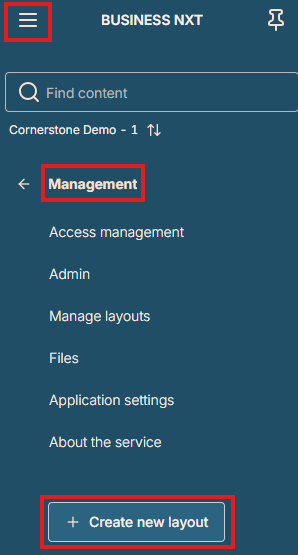
2) Go to "Management" and press "Create new layout"
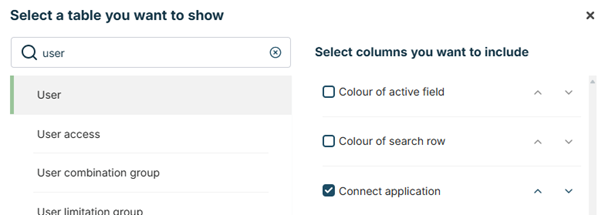
3) Press "New element" and choose "Table".
Select "User", and include the column "Connect application":
4) Press "New element" to also add table "Connect application access".
5) Move the tables around so you can access both tables and then press "Done editing" at the top.
6) In the User table click on "New" and write "isv_bdo_heartbeat" directly in the cell (you can also double click the cell to edit the content) and check the box for "Connect application". Press Save.
7) In the Connect application access table click "New" and add the user "isv_bdo_heartbeat". You can either double click in the cell to search for the user or write directly in the cell.
Then double click in the cell "Company no." to look up the company we want to give access to.
Double click the cell "Access group no." and select "Standard".
Alternatively you can use "Company group no" to give access to a group of companies.
Press Save.
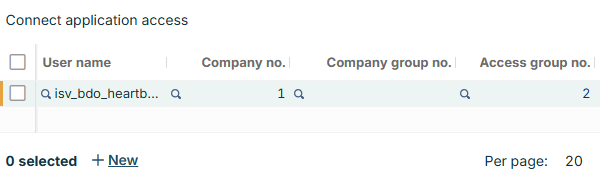
This view can be adjusted later to add more companies that BDO should get access to or remove our access.